Getting Started
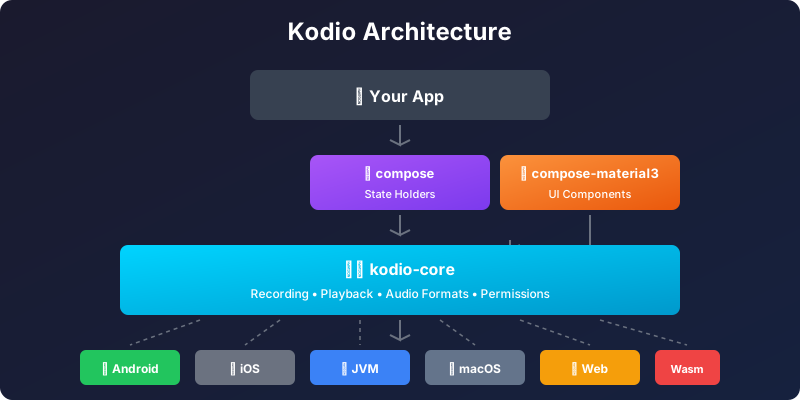
Kodio is a Kotlin Multiplatform library for audio recording and playback. It provides a simple, coroutine-based API that works identically across all supported platforms.
Add the dependency
Add Kodio to your commonMain source set in your Gradle build file:
First, add to your libs.versions.toml:
Then in your build.gradle.kts:
Record and play audio
With Kodio, you can record audio and play it back in a few lines of code. The API follows Kotlin idioms like coroutines and extension functions.
The record function is a suspend function that captures audio for the specified duration and returns an AudioRecording object. You can then play it, save it, or process it further.
Supported platforms
Kodio supports all major Kotlin Multiplatform targets:
Platform | Status | Notes |
|---|---|---|
Android | Stable | Requires |
iOS | Stable | Requires Info.plist entry |
macOS | Stable | Requires entitlements |
JVM | Stable | No setup required |
JS | Stable | HTTPS required |
Wasm | Stable | HTTPS required |
Available modules
Kodio is split into modules so you can include only what you need:
- space.kodio:core
The foundation module providing recording, playback, and file I/O. This is the only required module.
- space.kodio.extensions:compose
Compose Multiplatform state holders (
rememberRecorderState,rememberPlayerState) and theAudioWaveformcomponent.- space.kodio.extensions:compose-material3
Pre-built Material 3 UI components like
RecordAudioButton,PlayAudioButton, andErrorDialog.- space.kodio.extensions:transcription
Audio transcription using OpenAI Whisper API. Provides
OpenAIWhisperEngineand theAudioFlow.transcribe()extension.
What's next
Jump to Quick Start for common recording and playback patterns.
See Installation for detailed dependency configuration and Platform Setup for platform-specific requirements.
If you're building with Compose, check out RecorderState for reactive recording UI.